
Administrative Configuration
Administrators manage re-enrollment permissions at the course level to ensure the workflow is only available for appropriate training items.
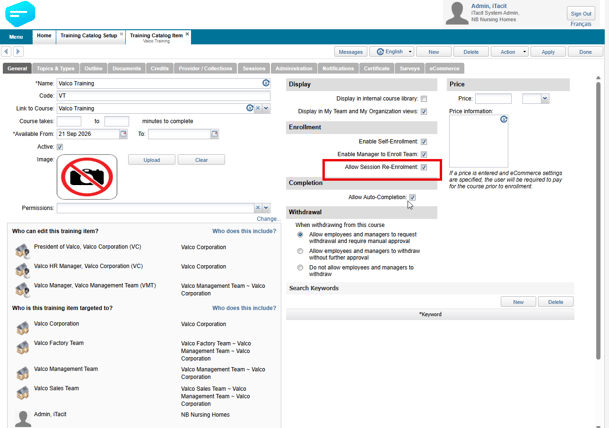
- The Setting: Within the Training Catalog Item configuration, administrators can toggle the option: "Allow Session Re-Enrollment."
- Granular Control: This setting can be enabled or disabled on a per-course basis, providing flexibility across the training catalog.
Enrollment Workflows
The system supports re-enrollment through several different paths to accommodate both self-service and managed training:
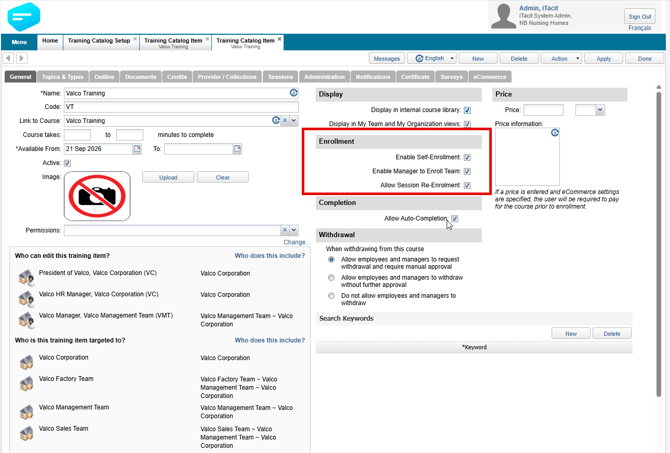
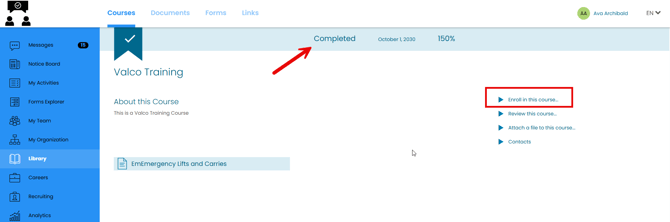
- Learner Self-Service: Learners who have previously completed a session-based course can navigate to the Course Profile page in the Course Library. They will see the "Enroll in this course" option, allowing them to select a new session and re-enroll directly.
- Manager & Coordinator Support: Managers can re-enroll their team members, and Training Coordinators can use the Create Transcripts tool to re-enroll learners into session-based courses as needed.
- System Messaging: Notification emails for transcript creation use clear language to identify when learners are not processed due to existing active enrollments.
Important Considerations
- Withdrawal Behavior: Learners who have withdrawn from a session can enroll in a different session for the same course at any time. The "Allow Session Re-Enrollment" setting specifically governs re-enrollment after a completed (non-withdrawn) status. 💡