
Questions that contain branching logic are marked with a dedicated icon within the Form Builder.
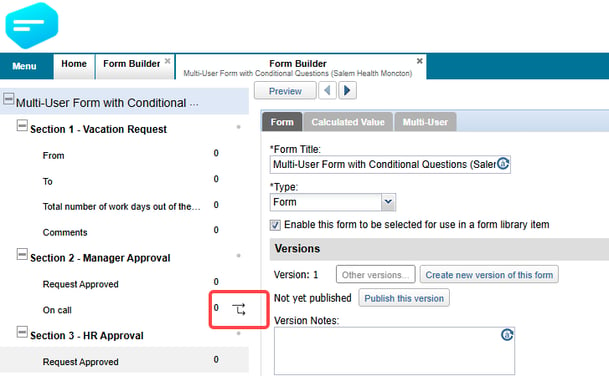
This visual indicator allows administrators to quickly distinguish between standard questions and those that control conditional form behaviour.
Benefits
- Provides immediate visibility of branching logic within a form.
- Helps identify questions that trigger conditional workflows.
- Makes complex form structures easier to understand at a glance.
Reviewing Form Logic
The branching logic indicator assists administrators when reviewing or auditing form definitions.
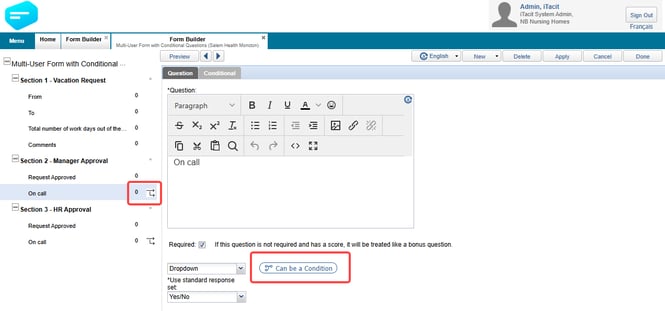
By highlighting questions that influence the user's path through a form, administrators can more easily:
- Locate logic-driven questions.
- Verify workflow paths and dependencies.
- Assess the impact of proposed changes to form design.
Editing Forms with Branching Logic
When modifying an existing form, the branching logic indicator helps administrators recognise questions that may affect other sections of the workflow.
Having visibility into these logic dependencies supports more informed editing and helps maintain the intended form experience.
Benefits
- Simplifies navigation within complex forms.
- Reduces time spent searching for logic-controlled questions.
- Helps prevent unintended changes to conditional workflows.
- Improves the overall form maintenance experience.
Summary
The branching logic indicator in Form Builder provides a clear visual cue for questions that control conditional form behaviour. By making logic-driven questions easy to identify, administrators can more effectively review, maintain, and update form definitions while preserving existing workflow dependencies.