
I Can View
The I Can View tab is designed for users who need visibility into form submissions without making workflow changes.

Users with access to this tab can:
- View and review form submissions
- Monitor submission details and progress
- Access forms that are not directly assigned to them, when permission has been granted
The I Can View tab does not provide access to form management functions such as:
- Reassigning forms
- Releasing claims
- Changing due dates
This ensures that reviewers can access the information they need while preserving the integrity of the workflow.
I Can Manage
The I Can Manage tab is intended for users responsible for coordinating and managing form workflows.
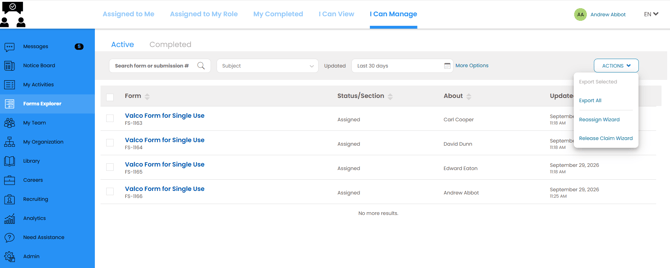
Users with access to this tab can:
- View form submissions
- Reassign forms to other users
- Release claims on forms
- Change form due dates
- Perform workflow coordination activities
This access level is suitable for supervisors, coordinators, and other users who need to manage the flow of work across form submissions.
Access Summary
| Tab | Purpose | Available Actions |
|---|---|---|
| I Can View | Review and monitor form submissions | View submissions and related details |
| I Can Manage | Coordinate and manage form workflows | View submissions, reassign forms, release claims, and change due dates |
When to Use Each Tab
Use I Can View when you need to review form submissions without making changes to workflow assignments or deadlines.
Use I Can Manage when your role requires you to coordinate work, adjust assignments, manage claims, or update due dates to support operational processes.
Provide your feedback on BizChat