
iTacit Document Viewer:
Viewing Documents and Attachments On-Screen:
iTacit’s built in document viewer allows you to view images, videos, text documents, etc., throughout your iTacit site.
The document viewer allows you to view content on-screen (i.e. within your iTacit site) and off-screen (i.e. ability to download content, if permissions allow).
Uploading Content:
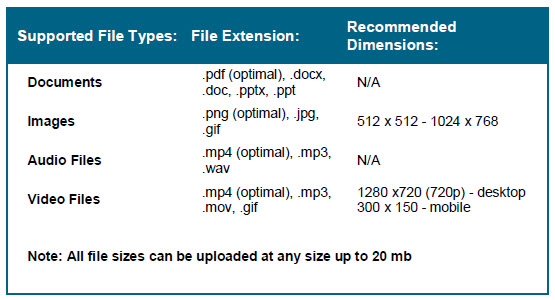
External content can be uploaded to iCourses, Training Catalog Items, Posts, Messages, and the Library. The table below outlines our currently supported container types, as well as size recommendations:
Downloading Documents and Attachments:
Users are able to download documents to be viewed outside of iTacit, if permissions allow, by opening the desired document, and selecting “download” within the document viewer toolbar:

Please note that some document types typically require the existence of software on the viewing device that is capable of opening the uploaded document type. For example, if you upload a Microsoft Word (.docx) document, the viewing user who downloads the document must have Microsoft Word installed on their device to view the document.