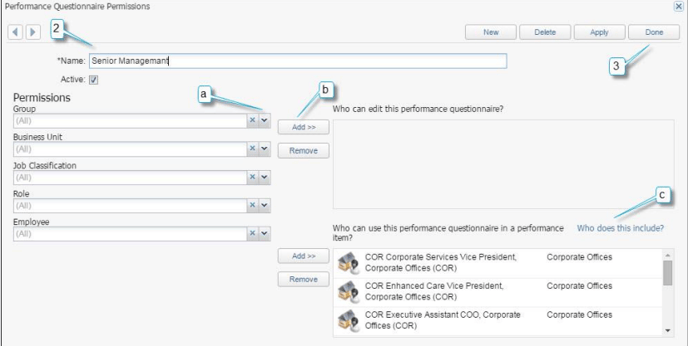
Permission Groups can be set up to help in the set-up of multiple Performance Questionnaires involving the same individuals in the Edit and Who Can Use groups.
1. Select Menu > Performance Management > Performance Questionnaire Permissions.
a. Search for the desired Group, Business Unit, Job Classification, Role and/or Employee.
b. Select Add to be add your selection to the desired section.
c. Select Who does this include? to view the names of employees included in the desired section.
2. Select New. Enter the Name of the permission group.
3. Select Done.
If you accidentally add the wrong group(s) to a permission section, highlight the group and select Remove.