
In multi-user forms, each section may be assigned to a different user. If a manager or reviewer becomes unavailable (e.g., on leave), you can reassign their section to another user to keep the workflow moving.
Example: A manager is on extended leave during performance review season. Their assigned section in the “Annual Performance Review” form needs to be reassigned to another team lead.
-
Locate the submission
-
Reassign the section to the backup manager
-
The form continues without delay
----------------------------------------------------------------------------
1. Log on to iTacit Admin site as an Administrator
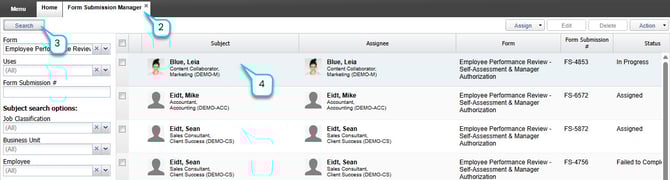
2. Navigate to Menu > Library > Form Submission Manager
3. Use the Search Filters to find a form you want to reassign. Click Search.
4. Click on the submission that you want to reassign.
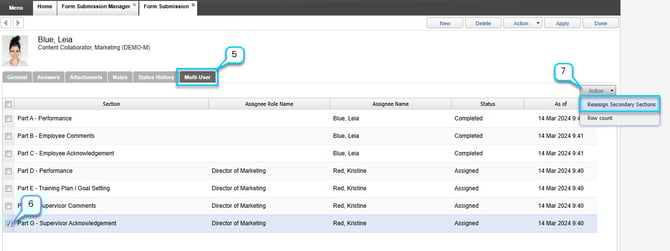
5. Go to the Multi-User tab.
6. Select the section assigned to the unavailable manager.
7. Go to Action > Reassign Secondary Sections
8. Search for a new manager/user by using the search criteria.
9. Click on the manager/user to assign the selected section to them.
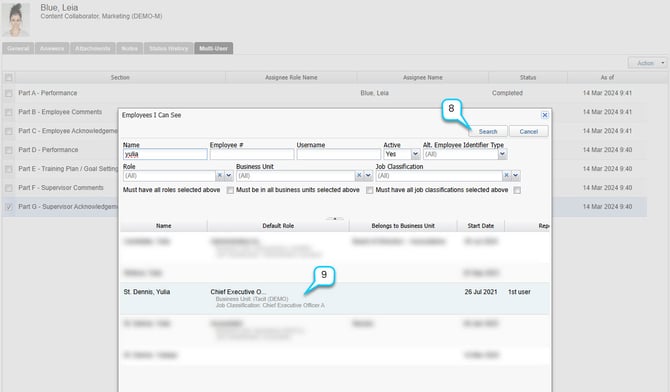
10. Click Apply to save changes. The new assignee will receive the form and can continue the workflow.