Phased learning allows administrators to deliver training in a structured, time-based sequence. With the Program Phases tab in iTacit’s Knowledge Program setup, you can organize training requirements into distinct phases that roll out progressively over time. This approach supports onboarding, compliance, and development programs where content must be completed in a specific order or at scheduled intervals.
What Are Program Phases?
The Knowledge Program Phases feature allows training coordinators to roll out learning programs in structured, time-based segments. This phased approach helps employees absorb content progressively, ensuring better retention and alignment with operational timelines.
With this setup, you can:
-
Organize training requirements into phases that start at specific intervals.
-
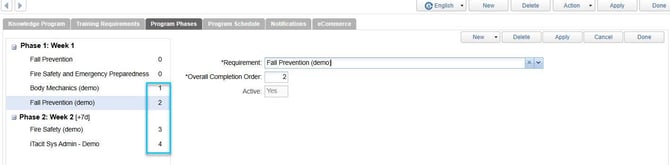
Control the order of completion for each requirement.
-
Automatically adjust transcript start dates based on phase timing.
-
Use drag-and-drop tools to reorder phases and move requirements between them.
This feature is ideal for onboarding, compliance training, or any program that benefits from staged learning delivery.
Creating a New Phase
1. Open the Knowledge Program Setup screen.
2. Navigate to the new “Program Phases” tab.
3. Click New > New phase.
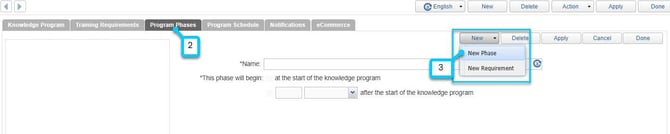
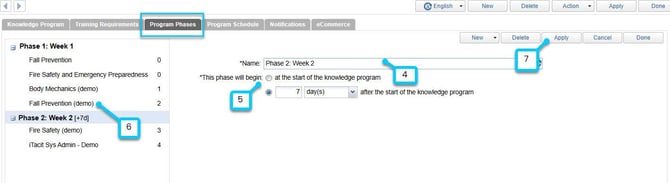
4. Enter a Name of the phase.
5. Choose when it begins:
-
At the start of the program, or
-
After a set number of days/weeks/months.
6. For each requirement:
-
Select the training item.
-
Set its completion order.
-
Ensure it aligns with phase logic (e.g., prerequisites must be in earlier phases).
7. Click Apply to save changes.
When assigning the program to employees:
-
Transcript start dates will reflect the phase timing.
-
Requirements in future phases won’t appear until their start date.
Notifications
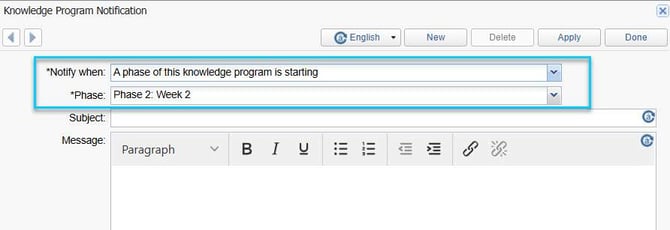
You can now create a new notification type: “A phase of this knowledge program is starting.”
-
This sends alerts to enrolled employees on the start date of each phase.
-
Helps keep learners informed and engaged throughout the program.